

An ERP system plans and records the business: orders, finance, purchasing, stock and people. A manufacturing execution system (MES) runs and records production on the shop floor, in real time, connected to the machines. They are not rivals. Most factories need both, with the ERP deciding what to make and the MES showing what is actually happening while it is made. If your ERP tells you what you planned but not why the line is behind, the gap is an MES. That is the gap Mestric™ MES is built to close.
ERP is enterprise resource planning. MES is manufacturing execution system. The names already point to the difference: one plans resources across the company, the other executes production on the floor.
An ERP is described as a business management solution that reaches beyond production into accounting, sales, inventory and human resources, and acts as the organisation’s central database. An MES, in the same description, is software that manages, controls and improves the manufacturing process using data collected in real time from sensors, barcode scanners and employee input.
A simple way to remember it: the ERP is the office view of the factory, the MES is the floor view.
The table below summarises the differences that matter in daily work. The scope, time horizon and user groups follow the comparison published by Lemon Learning.
| Criterion | ERP | MES |
|---|---|---|
| Scope | Whole company: finance, procurement, sales, HR, logistics | Plant floor: work order execution, machine monitoring, quality |
| Time horizon | Days, weeks, months (planning cycles) | Real time, seconds to shifts |
| Data granularity | Order, department and company level | Machine, operator and lot level |
| Typical users | Finance, procurement, supply chain, HR, senior management | Production supervisors, quality engineers, plant operators |
| Data source | Transactions entered by people and other systems | Equipment, sensors, scanners and operator input |
| Question it answers | What should we make, buy and ship, and what does it cost? | What is happening on the line right now, and why? |
ERP covers every function that supports the business. Finance books the invoices, purchasing orders material, sales takes customer orders, and the planner releases production orders against available stock and capacity.
An MES starts where the ERP stops. Once a production order reaches the floor, the MES tracks each step from raw material release to finished goods. It knows which machine is running which order, how many good parts were made, how long the machine stood still and for what reason.
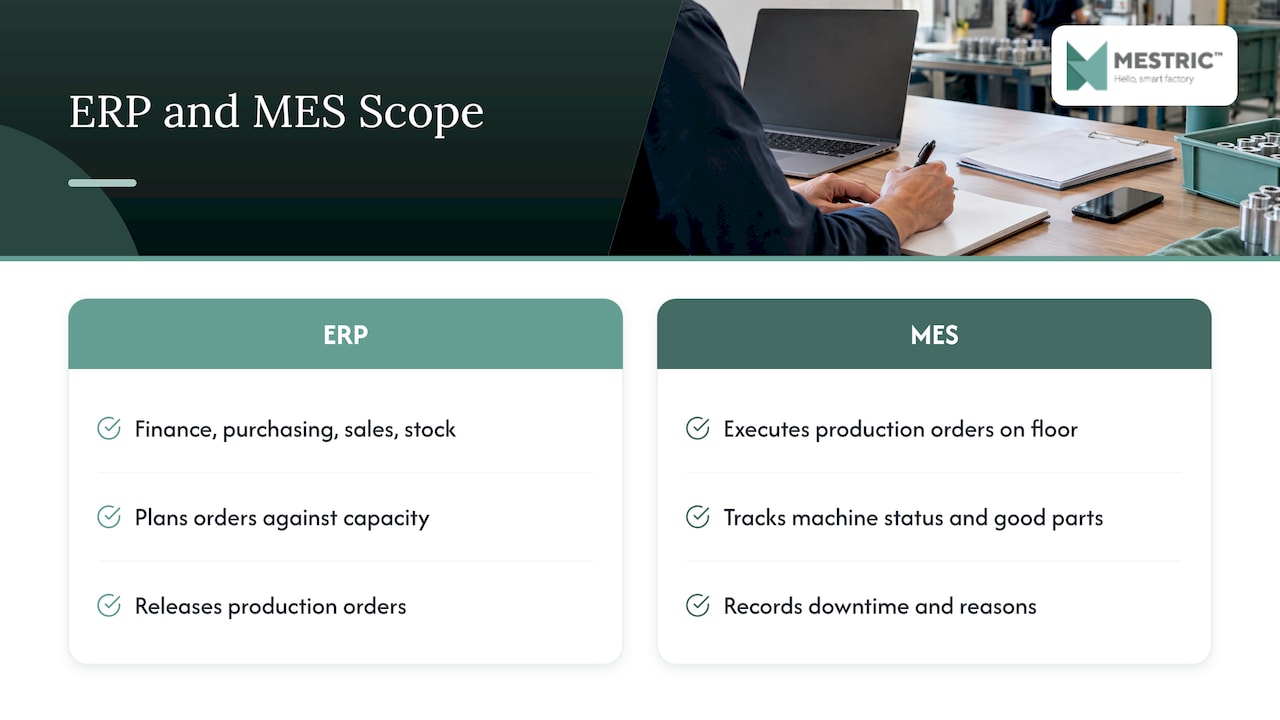
This is why an ERP rarely replaces an MES. ERP software is typically orientated towards logical planning for the factory, while MES software is more concerned with the physical operation, as ASSEMBLY magazine explains. It also notes that without an MES the translation of the ERP plan into executable production tasks is most often done manually.
The time dimension is the most useful test. Ask how fast a decision has to be made.
If a machine stops, the supervisor needs to know within minutes, not at the end of the week. If the finance team closes the month, a delay of hours in processing the data is normal.
This is not only industry opinion. A doctoral dissertation at the University of Maribor, based on a real information system in the Slovenian automotive industry, found that ERP data arise from business events, are comparatively small in amount and infrequent, and that several hours’ delay in processing them is acceptable. MES data, by contrast, must be gathered and processed in real time.
In practice that means:
The machine-level data is only useful if it is captured automatically. Manual entry at the end of a shift gives a record, but no chance to react. If you want to see what that data covers, our guide to the types of manufacturing data and how they are collected is a practical starting point.
An ERP is opened by planners, buyers, accountants and managers. An MES is opened by operators, line supervisors, quality staff and plant managers.
For a plant manager the difference is felt in the morning meeting. ERP reports tell you which orders were due and which were delivered. An MES tells you where the shift lost time, which machine caused it and how that affected output and quality. The first is a record of results, the second is something you can act on while the shift is still running.
The two systems exchange a small number of data flows. Each direction has a clear purpose.
From ERP to MES:
From MES to ERP:
With this loop in place, the ERP stops guessing. It plans against real quantities and real times instead of standard values nobody has checked for months. The shop floor, in turn, stops retyping the plan.
Many Slovenian manufacturers run SAP as their ERP, so integration with SAP is one of the most common questions. The technical routes are well established. A 2026 academic paper on SAP Digital Manufacturing and S/4HANA describes integration through standardised technologies: SAP Integration Suite, IDoc-based communication, APIs and the Data Replication Framework. The master data exchanged includes the material master, bills of materials, routings and task lists, work centres, production versions and batch master data.
For any MES, including ours, the practical points are the same:
The same logic applies to other ERP systems, whether they are large suites or smaller business packages. The interface changes, the data flow does not.
Slovenia has good local examples, which matter more to you than generic claims.
The University of Maribor dissertation mentioned above built a two-way interface between an ERP and an MES in an automotive company using the standard IDoc format. After six months of continuous use it reported improvements of 48% in the velocity dimension, 25% in costs and 29% in assets. It is one study in one company, but it shows what connecting plan and execution can do.
At a larger scale, the Kolektor-led JUMP digital transformation project, completed in March 2024 with partners Domel, Špica International and Audax, connected previously separate information systems including SAP and an MES into one information backbone, with automation of production workstation tasks.
Integration projects most often go wrong for ordinary reasons, not technical ones.
Our article on real-time data integration with MES platforms goes deeper on the data side.
Use these questions to decide.
You need an ERP if you must manage finance, purchasing, sales and stock in one place, and plan production against orders and capacity.
You need an MES if any of the following is true:
You need both if you are a manufacturer of any size that wants plans that match reality. The ERP is the plan and the financial record. The MES is the execution and the live data.
It is also worth knowing how the investment compares. A CFO guide for manufacturers from a US finance advisory firm, published in July 2026, reports common first-year costs of US$150,000 to US$600,000 for an MES pilot against US$500,000 to US$2,500,000 for an ERP. It gives timelines of 3 to 6 months for an MES pilot against 9 to 24 months for an ERP, and payback of 12 to 24 months for MES against 2 to 4 years for ERP. These are US figures and will differ in Slovenia, but they show the order of magnitude: an MES is the faster, smaller step, and you can take it without touching the ERP.
We hear the same sentence from many production managers: “The ERP says we produced it, but I do not know how.” That is exactly the gap an MES is meant to fill.
We built Mestric™ to connect directly with manufacturing equipment, so performance, downtime, quality parameters and cost analysis reach the people who run the floor without anyone typing them in. Automated data capture means fewer manual errors, and live KPI dashboards mean a stoppage is visible while you can still act on it.
Our view is simple. Your ERP is the right place for orders, finance and stock. Production needs its own layer that works at the speed of the machine. Once that layer exists, the data it collects can inform your planning, and AI-powered optimisation tools can point to bottlenecks and process improvements that no monthly report would reveal.
Ease of use matters as much as features. A system that supervisors and operators actually open every shift is worth more than one that only IT understands.
Andraž
Mestric™ MES is a platform for factories that combines real-time performance tracking, quality monitoring, downtime analysis, cost analytics and machine integration, with AI-powered optimisation tools. It connects directly with your equipment and shows KPIs such as performance, downtime, quality parameters and costs on the shop floor.
You can see it working in a real production environment through an onsite presentation at our demo centre. Start with the Mestric™ MES solution page to see what the platform covers.
If you want to prepare first, our guide to assessing current production workflows and data shows how to map what you measure today.
To see the wider case for the MES layer, read about the benefits of MES systems for modern manufacturing and how an MES compares with traditional manufacturing methods.
ERP manages the whole business: finance, purchasing, sales, stock and planning, over days to months. MES manages production execution on the shop floor in real time, from seconds to shifts. The ERP decides what to make, the MES controls and records how it is made.
In most factories it cannot, because an ERP works at order and company level and is not built to capture machine-level data in real time. Without an MES, the production plan is usually turned into floor tasks manually. An MES adds the live execution layer on top of your ERP.
The ERP sends production orders, schedules and master data such as materials, bills of materials and routings. The MES returns execution confirmations, material consumption, and quality or downtime events where they matter for finance or customers.
Yes. Integration with SAP is commonly done through standard technologies such as IDoc, APIs and SAP Integration Suite, exchanging master data and production orders. The key is agreeing which system owns which data and starting with one line.
No. SCADA supervises and controls equipment and processes at machine level. An MES works above it, managing production orders, quality, performance and downtime across the plant, and linking that picture to the ERP.


 069 763 552