

Work instruction management means controlling how every operator instruction is written, approved, versioned, delivered to the workstation and checked in use. Done well, the operator sees only the current approved revision, changes reach every shift on the same day, and you can prove it to an auditor. This guide explains how to set that up in a plant, where digital tools help, and what the EU rules change for you.
A work instruction tells an operator how to do one task: set up a machine, assemble a part, run a check, change over a tool. Management of those instructions covers the whole life cycle, not only the document.
Most plants are strong on steps 1 and 2 and weak on steps 3 to 5. That gap is where defects, rework and audit findings come from.
Paper works while the product mix is stable and the team is small. It struggles when any of these appear:
The quality standard behind many Slovenian suppliers points the same way. In the 2015 edition of ISO 9001, documented information replaced the older split between documents and records, which puts the emphasis on controlling what is available and in use, not on keeping binders.
Whatever tools you use, check your process against this list.
| Requirement | What to check | Typical paper weakness |
|---|---|---|
| One source of truth | Every station draws from the same approved master | Local copies and personal files |
| Revision control | Only the current approved revision is visible | Old printouts remain in use |
| Traceability | You can show who approved it and when it went live | Signatures on paper, hard to retrieve |
| Role-based access | Authors, approvers and operators have different rights | Anyone can edit a shared file |
| Language and variant fit | Operators see the instruction for their product and language | Search through large binders |
| Feedback loop | Operators can flag unclear steps | Comments lost or ignored |
| Link to execution | Instructions tie to the work order and to recorded results | No connection to production data |
The last row is the one most plants overlook. An instruction that is separate from production data tells you what should happen, but never what did happen.
Digital work instructions replace the static page with an interactive, version-controlled procedure shown on a tablet, screen or workstation terminal. The practical effects are:
This is also where tacit knowledge gets captured. Experienced operators often know the trick that keeps a fixture aligned or a seal seated. Recording them doing the task, then reviewing and approving the clip, turns personal know-how into a standard that every shift can follow, including after that person changes role or retires.
A common worry is that going digital means ripping out the quality management system or the production system. It does not. The documents your quality team approves can stay in their current repository. What changes is how the approved content reaches the operator and how its use is recorded. Look for an approach that integrates with your existing systems, not one that duplicates them.
If you want to see how instructions fit among the other layers of plant software, our overview of seven types of manufacturing software shows where an MES sits next to ERP and PLM.
Plants often budget for the software and forget the effort of producing the instructions. Recording, editing and reviewing content is where time disappears, especially when busy process engineers do it alongside their other work. Decide early who creates content, who reviews it, and how many instructions you realistically need in the first three months. Starting with the operations that cause the most defects or the most training effort keeps the workload sensible.
If you build, modify or place machinery on the EU market, one date matters. Regulation (EU) 2023/1230 becomes mandatory on 20 January 2027 and replaces Directive 2006/42/EC, as EU-OSHA’s legislation page summarises.
A distinction is worth making clear. The regulation governs the instructions for use that a machine manufacturer supplies with the machine. It does not directly regulate your internal operator work instructions. But the rules shape what your machine suppliers deliver, and if you are a machine builder yourself, they apply to you.
For machine manufacturers, the regulation allows instructions in digital form, with conditions:
There is also a right to paper. According to tekom Europe’s position paper, if the user asks at the time of purchase, the manufacturer must provide paper instructions free of charge within one month. The same paper argues that digital instructions form part of the product, so their navigation, accessibility and clarity fall under risk assessment and conformity assessment.
What this means in practice:
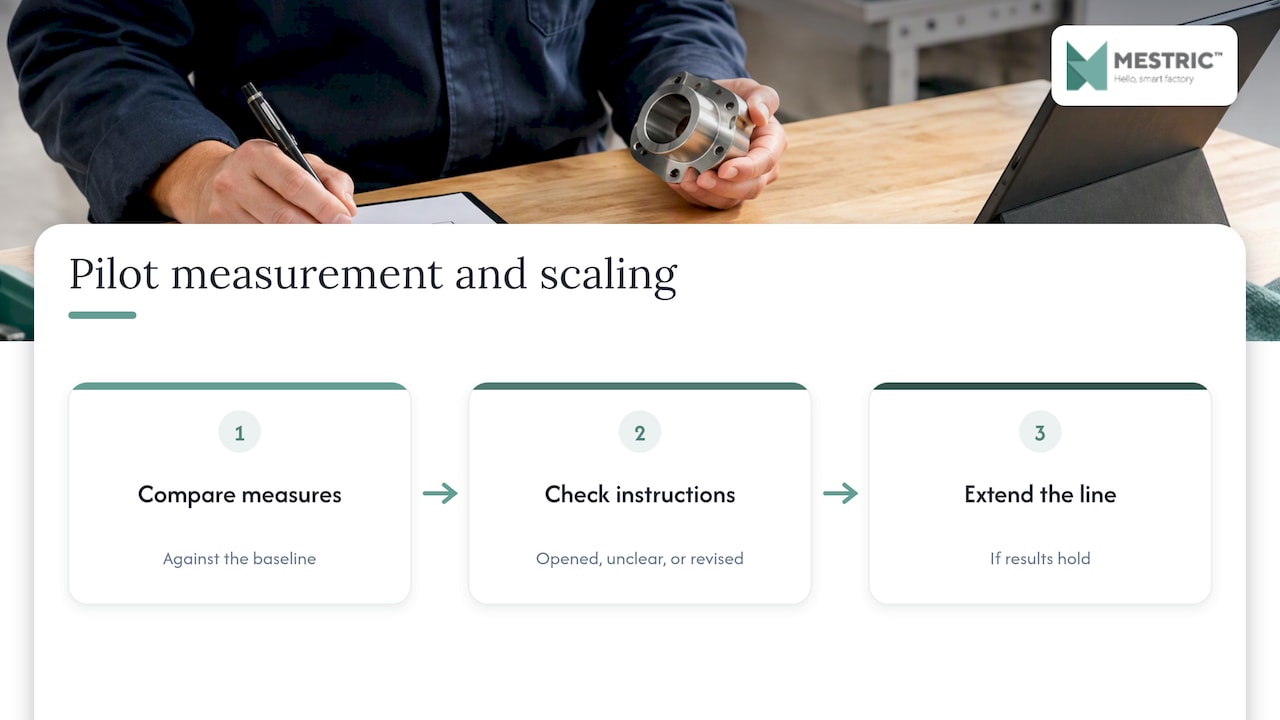
Choose a line with visible pain: frequent changeovers, high scrap on a specific operation, or long onboarding for new operators. Define two or three measures before you start, such as first-pass yield, changeover time and time to train a new operator.
Do not digitise the whole library. Take the 10 to 20 instructions that matter most for that line. Use photos and short videos recorded at the station. Have the approver review them in the same way as any controlled document.
Show instructions at the workstation, tied to the work order, on a device that survives the environment: dust, gloves, noise, coolant. Involve operators in the first review. Their corrections are what make an instruction usable.
After four to six weeks, compare the measures with the baseline. Check which instructions were opened, which were flagged as unclear and which revisions changed. If the results hold, extend to the next line using the same pattern. We describe a pilot of this kind on our page about proving digital work instructions in 4–6 weeks.
An instruction becomes more powerful when it is linked to what the machine and the operator actually did. In an MES, the work order is the anchor: it carries the product, the routing, the machine, the operator and the time. When the instruction opens from that work order, you can later answer questions such as:
This is the same logic as in logistics, where paper handovers are replaced by guided digital steps, as the principles of warehouse management system automation show for the warehouse side of the plant.
For the quality side, see our guides to the quality monitoring workflow und real-time performance tracking. For the wider picture of visibility on the floor, read what a digital shop floor is.
We talk to plant teams regularly, and the pattern is consistent. Work instructions are rarely the problem on their own. The problem is that they live apart from the rest of production: written in one place, printed in another, and never compared with what the machines report.
That is why we think about instructions as part of the manufacturing execution layer. At Mestric we build a system that connects directly to equipment, collects data automatically and shows KPIs such as performance, downtime and quality parameters to production managers. An instruction that sits next to those numbers can be judged by its results. If a step is unclear, the scrap and stoppage data will show it sooner than an audit does.
Our advice is modest and practical. Do not start with a company-wide programme. Start with one line, one set of measures and a clear owner for content. Keep your existing quality documents. Let operators judge the result, because they are the ones who use it for eight hours a day.
— Andraž
If you want to judge how connected machines, live KPIs and shop floor data work together, we offer a demonstration in a real production setting. Read about Mestric™ MES and ask us for an onsite presentation. Pricing is discussed after the demo, because it depends on your plant.
A procedure describes a process at a higher level: who does what, in which order, across departments. A work instruction describes one task at the workstation in operator-level detail. Procedures usually point to the work instructions that support them.
Not necessarily. Many plants keep paper for a few cases, such as safety-critical steps that must be available during a power or network failure. Plan for that fallback when you design the rollout. For machine manufacturers, the EU Machinery Regulation also gives users a right to request paper instructions at purchase.
No, not directly. It covers the instructions for use that manufacturers supply with machinery and related products. It still matters to you as a buyer, because it shapes what your suppliers must deliver from 20 January 2027. If you build machines, check your own manuals against it.
A focused pilot on one line can be judged in four to six weeks. The time depends mostly on how quickly you create the first set of instructions and how soon operators start using them at the station.
No, you can start with a document control tool and digital display. An MES adds the link to work orders, machine data and quality results, which lets you see whether instructions improve outcomes.


 069 763 552